
It Wasn't the AI: The Zoom Bug That Was Our Camera
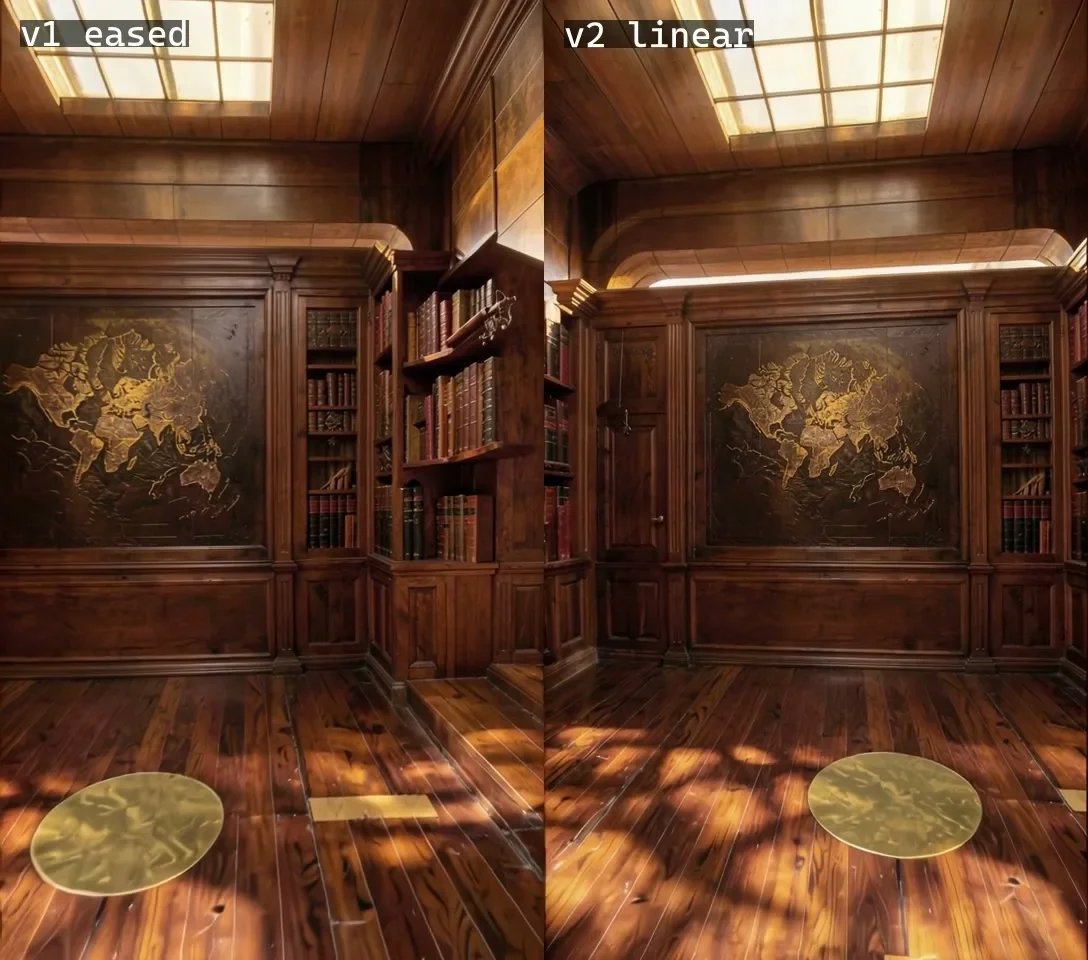
Our vertical clip looked like it was zooming on its own. Measuring scale frame by frame showed the video model was copying our eased camera keys to within ±0.05%.
Key takeaways
- The symptom: the top of the far wall seemed to grow, as if the frame were rescaling itself mid-shot.
- We measured scale between consecutive frames with feature matching and a similarity transform, on both the grey layout and the AI output.
- The eased camera went from 0.01% per frame at the start to 0.62% per frame. The AI matched the layout within ±0.05%.
- The cause was default auto/cubic camera keys plus a little yaw and pitch. Linear keys with constant height, pitch and roll measured 0.373, 0.399 and 0.404% per frame: flat from frame 0.
- In a layout-driven pipeline a camera fault looks exactly like an AI fault. Measure before blaming the model.
The symptom
This is part of our series on using Unreal Engine as the camera for AI video; the pipeline itself is in Unreal Is the Director. In short: we animate a camera through a grey set in Unreal, and LTX 2.5 with the Layout-To-Render IC-LoRA paints the finished image over it.
The first vertical clip was a dolly through a wood-panelled library toward a carved map panel. It looked good on the first frames. Then, a little way in, it started to feel wrong: the top of the far wall seemed to grow, as though the frame were slowly rescaling itself rather than the camera moving through a room.
Anyone who has worked with AI video recognises that feeling. Models drift, invent zooms and breathe. Our first instinct was to blame the model and start changing its settings.
How we measured it
Before touching a setting, we measured. For every pair of consecutive frames we detected and matched features, then fitted a similarity transform: rotation, uniform scale and translation. The scale term tells you how much bigger the picture got from one frame to the next.
The important part is that we ran the same measurement on both clips: the grey layout from Unreal and the finished clip from the video model. That turns a vague question ("is the AI zooming?") into a precise one. If the finished clip scales differently from the layout, the model is adding motion. If they match, the motion is in the camera.
A dolly toward a wall always produces some scale change, because the wall really does get bigger as you approach it. So the question is not whether scale changes, but whether it changes the way the move says it should.
What the numbers said
| Frames | v1, eased keys | v2, linear keys |
|---|---|---|
| 0–10 | 0.113% | 0.373% |
| 10–40 | 0.400% | 0.399% |
| 40–80 | 0.620% | 0.404% |
The eased version starts almost still, at 0.01% per frame, and accelerates to 0.62% per frame. The camera was creeping at first and then speeding toward the wall. Combined with a little yaw and pitch on the same keys, that acceleration reads on screen as the image swelling rather than the room approaching.
And the finished clip matched the grey layout within ±0.05%. The video model had not invented anything. It had faithfully reproduced a camera move we never meant to make.
The cause: default keys
Sequencer's default keys are auto/cubic, which ease in and out. That is a sensible default for character animation and a bad one for a dolly that is meant to move at a constant speed. Two keys, start and end, gave us a camera that accelerated through most of the clip.
The small yaw and pitch on the same keys made it worse. Each one eased on the same curve, so the framing tilted a little more as the move sped up, and the top of the far wall was where the eye noticed it.
The fix
We set every camera key to linear and kept height, pitch and roll constant. The second render measured 0.373, 0.399 and 0.404% per frame across the same three ranges: flat from frame 0. The "zoom" was gone, and nothing about the video model had changed.
Why this matters beyond one shot
Layout-To-Render follows its layout so closely that every flaw in the layout becomes a flaw in the shot. That is the price of control. The upside is that the flaws are now ones we can measure and fix in a scene, rather than ones we can only re-roll and hope about.
It also cost nothing to find. The whole investigation ran locally at $0 per render. On a paid cloud model, each wrong guess about the cause would have been another paid clip; we compare the two rails in Layout-To-Render vs Seedance 2.5.
The next problem in the same shot was not motion but detail: what happens to thin geometry at the end of a dolly. That is Where AI Video Forgets. Back to the series overview: Unreal Is the Director.