
The $0 UGC Ad Pipeline: Roster Personas, Voice, and Scale
How we produce local UGC selfie ads with synthetic talent: locking product scale through body ratios, eye-level framing, and JSON-linked voices.
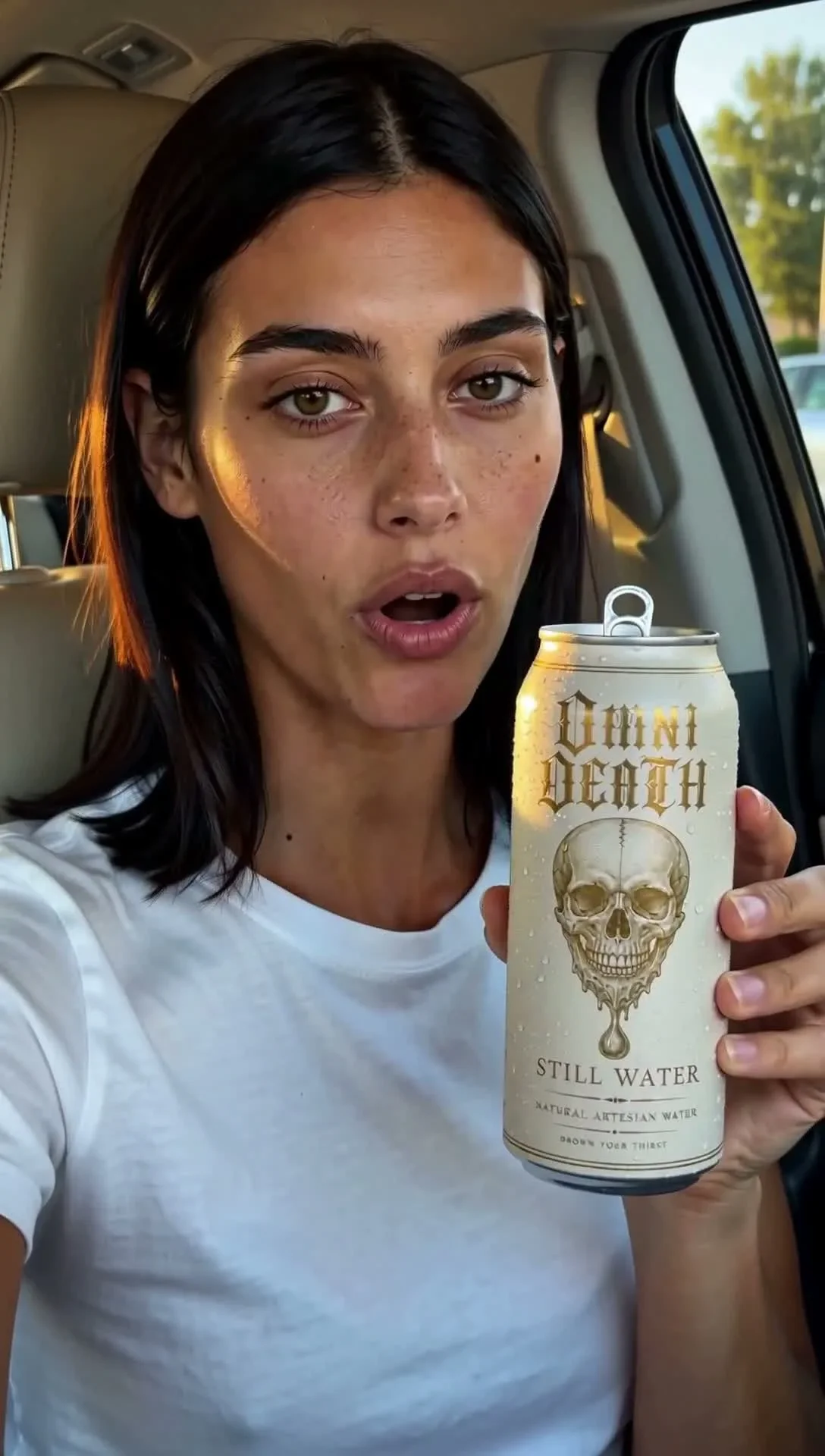
Key takeaways
- Product dimensions must be prompted as relative body ratios rather than centimeters to prevent severe scale drift.
- Held objects must sit at eye level on the same focal plane as the face from frame zero, moving sideways and never toward the lens.
- Voice reference audio must be pulled directly from the character configuration JSON reference_file, not by guessing file basenames.
- FastH3 speaks before drinking: 3 of 3 seeds spoke dialogue verbatim with an open beverage container in hand.
- The delivery chain requires native 1088×1920 generation finished through ArtPlayer Quality 2x to 4K; upscaling a 704 draft fails review.
The $0 local UGC production stack
Commercial UGC video ads require a creator holding, demonstrating, or wearing a product while speaking directly to the smartphone camera. Achieving this with synthetic talent at zero cost requires strict orchestration. Our pipeline runs locally on an isolated ComfyUI instance on port 7835 using `fasth3_r2v.py` with the `--audios` flag, benchmarked on 2026-10-26 across 20 production renders.
The input structure requires balanced multi-reference conditioning. We assign three images to persona identity (front, side, three-quarter angles), two studio packshots to product geometry, and a sixth critical reference showing the talent actually wearing or holding the product. Audio conditioning supplies a locked voice recording of 2 to 15 seconds to anchor vocal identity. This multi-modal conditioning ensures that both character likeness and product silhouette remain stable during natural handheld head movements.
In direct-to-consumer advertising, audience trust hinges on organic authenticity. Viewers are acutely sensitive to uncanny robotic stillness or detached synthetic voiceovers. Constructing a believable creator persona requires synchronizing casual conversational delivery with natural handheld smartphone framing, where minor perspective shifts and subtle facial reactions reinforce the illusion of live mobile recording.
The scale rule: body ratios and eye-level planes
Studio packshots provide zero real-world scale context. When an isolated product image is fed into a diffusion model, the generator draws the object roughly 1.3–1.5× too large in the hand, stretches it during motion, and abruptly snaps it to normal scale when placed near the head. Preventing this requires three strict rules.
First, prompt dimensions as a body-ratio rather than centimeters. Specifying metric units fails because diffusion models lack physical rulers. Writing that 'the can is as tall as her face from chin to brow and narrower than her face' locks proportional boundaries across seeds. For eyewear, specifying that 'the frame front is exactly as wide as her face from temple to temple' anchors the geometry.
| Pipeline Stage | Engineering Constraint | Measured Setting | Failure Mode if Violated |
|---|---|---|---|
| Product Dimensioning | Body-ratio prompting | Face-relative proportions | Centimeter prompts drift 1.3–1.5× too large |
| Spatial Positioning | Planar alignment | Eye level beside temple | Moving toward lens triggers perspective expansion |
| Voice Conditioning | Character JSON reference | Read reference_file key | Filename guessing loads wrong actor voice |
| Speech Pacing | Dialogue-action ordering | Speech first, sip last | Model sips immediately, dropping 0/4 lines |
| Output Resolution | Direct vertical raster | Native 1088×1920 | 704×1280 garbles 10-pt label typography |
| Upscale Finishing | ArtPlayer Quality 2× | 2176×3840 final delivery | Upscaled 704 drafts rejected for plastic skin |
Second, keep the object on the same depth plane as the face. The product must be held at eye level beside her temple from the very first frame. Motion must be directed sideways, never toward the lens. Prompts that mention holding the product close to the camera immediately trigger severe distortion and unnatural geometric morphing.
Wiring character voices from configuration files
Voice assignment cannot rely on filesystem basenames. In our asset folders, `miranda_drama3_ref.wav` contains Sienna's vocal performance from an earlier casting session, whereas Miranda's locked audio reference is `miranda_calder_pw_drama3_ref.wav`. Guessing filenames results in shipping commercial ads with mismatched voices.
Production scripts must read the `reference_file` field directly from the talent's canonical JSON configuration in `tools/omni-dramas/series/characters/`. The prompt schema requires four explicit references: declaring audio usage in the summary, specifying the voice in `subject_definitions`, noting pitch and timbre retention in `retention_analysis`, and opening dialogue lines with the persona speaking in her own voice from the audio slot.
Voice verification runs via `scripts/voice_match.py` using ECAPA acoustic embeddings. A correct voice link scores 0.61 to 0.68, whereas unconditioned generations drop to 0.09 to 0.18, and mismatched speakers score 0.20. Automated acoustic scoring confirms vocal identity before client review.
Maintaining acoustic consistency across a campaign series requires disciplined asset management. Synthetic talent agencies must treat vocal timbre as proprietary intellectual property. Linking vocal profiles directly to canonical JSON definitions guarantees that future episodic updates or localized ad variations maintain identical vocal resonance without accidental casting drift.
Packaging text and dialogue-before-action ordering
Fine packaging typography sets a hard floor on generation resolution. While headline wordmarks survive at 704×1280, fine text lines equivalent to 10-pt print turn into illegible smudges. Upscaling cannot reconstruct destroyed characters. Rendering at native 1088×1920 resolves small text lines cleanly.
Prompts must describe label layout generically and quote only universal phrases like 'STILL WATER'. Commercial brand names must never be written in prompt descriptions or dialogue lines, as corporate tokens activate intrusive model priors that override reference imagery.
Action sequencing determines dialogue completion. Older H3 FL2VA models drank immediately upon seeing a beverage can, dropping spoken lines in 0 of 4 runs. FastH3 reliably speaks before drinking: 3 of 3 seeds spoke the line verbatim with an open container in hand when dialogue was placed first and sipping was scheduled last. Structuring the prompt beats carefully prevents premature physical actions from swallowing speech.
Directing physical action in generative video demands careful timing coordination. When visual prompts demand simultaneous complex actions—such as manipulating packaging while delivering multi-sentence dialogue—cross-attention mechanisms tend to prioritize large bodily motions over subtle phoneme articulation. Separating the performance into distinct temporal beats ensures that spoken lines complete before physical demonstrations begin.
The 4K delivery chain and automated vision limits
The production workflow follows four disciplined steps. We draft 3 seeds at 704×1280 (taking ~6 to 7 minutes each) to evaluate hand positioning and acting performance. Once a winning composition is chosen, we render fresh seeds at native 1088×1920 (taking ~15 minutes each). Because diffusion models produce different takes across resolutions, re-using the 704 seed does not reproduce the composition.
Final delivery finishes the native 1088 render through ArtPlayer Quality 2x up to 2176×3840 (4K). An upscaled 704 draft was rejected in review because low-resolution inputs provide no underlying skin pore structure for upscalers to enhance. Native 1088 upscaled to 4K passed review as photorealistic.
Automated vision models cannot verify scale stability. In benchmark tests, multimodal vision models assigned scores of 8 to 10 to every take, completely overlooking severe hand and container growth. Verification must be performed by human eyes reviewing a 7-frame progression strip, ensuring that physical scale and contact boundaries hold steadily across the entire video take.
Related

Dynamic Beat Splitting: Pacing and Dialogue in AI Micro-Dramas
Fixed four-clip templates destroy dramatic tension. Dynamic beat splitting tailors continuous takes from 4 to 30 s while strictly enforcing dialogue budgets.

FastH3 Omni: Identity-Locked Persona Video on a Local GPU
FastH3 replaced WanGP Ref2VA on our local 16 GB workstation: render times dropped from 32 minutes to 5 minutes, dialogue followed the script, and 1088×1920 rendered direct.

Inside the Paper Wife Lookbook: Grade, Halation, Catchlights
Magnific Classic 2k hardened the eye catchlights on our upscales, so we wrote a fix. Here is the whole pipeline behind OMNI Lookbook Vol. 03, from 14 chat-generated frames to a 4:4:4 web edition.