
LTX 2.5 VFX Adapters on a 16 GB GPU: Clean Plate and Alpha Gen Work, Refine Doesn't
Lightricks shipped a set of post-production adapters for LTX 2.5: SDR to HDR, 8K, clean plates, mattes. We ran three of them locally on our own footage. Two earned a place in the pipeline. The upscaler did not.
Key takeaways
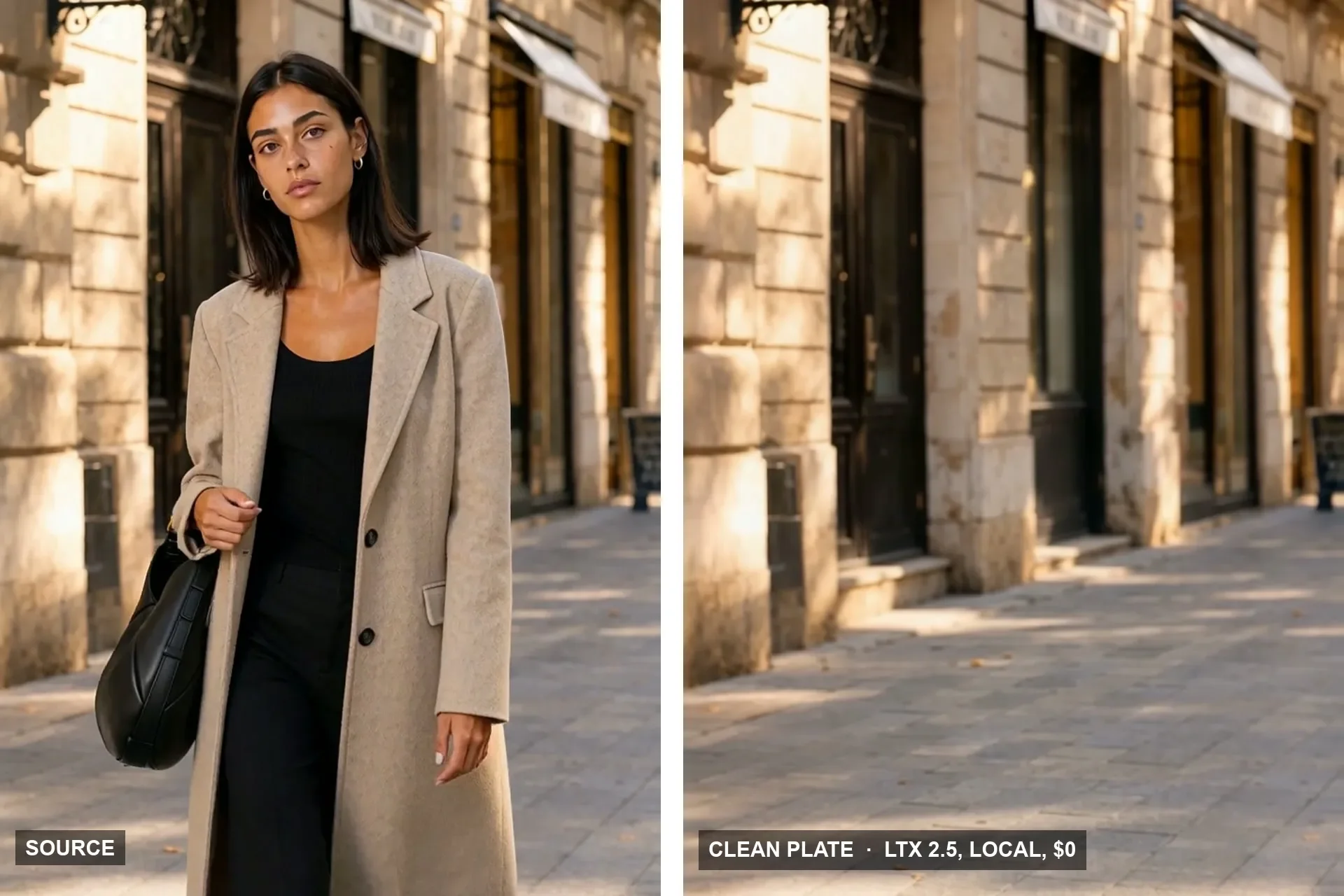
- Clean Plate removed a walking woman, her handbag and her shadow from a moving-camera street shot in 2.9 minutes for 97 frames, at $0 on a 16 GB card.
- Alpha Gen pulled a matte of a talk-show host with no prompt and no mask in 3.1 minutes. It picked the right subject and left the desk, chair and microphone out.
- Refine Details took 11.2 minutes to take a 720x1280 clip to 1088x1920, and at 3x zoom it was barely sharper than a plain lanczos resize. FlashVSR+ was clearly sharper.
- The SDR-to-HDR and native 4K/8K workflows exist, but on a 16 GB card and for SDR social delivery they were not worth testing first.
- If you build the tiled refine graph yourself: do not add a crop-guides node after the fusion sampler. It crops twice and the decoder gets an empty latent after the whole sampling run.
What Lightricks shipped
LTX 2.5 is Lightricks' open-weight video model. Around it the company has published about twenty IC-LoRA adapters: small add-ons that take an existing clip as a reference and return a transformed version of it. The headline ones are SDR to HDR (8-bit video in, 16-bit EXR and an HLG master out) and a tiled pipeline that takes footage to 4K or 8K. Less loud, and more useful to us, are Clean Plate (remove the people, keep the place) and Alpha Gen (a matte of the main subject).
We make vertical video for social platforms on a single RTX 5060 Ti with 16 GB. Lightricks lists 32 GB as the minimum for LTX 2.5. So the question was not what the adapters can do on an H100. It was which of them do useful work on our card, on our footage, in a time we can live with.
How we ran it
All three tests used the same setup:
- The distilled LTX 2.5 transformer in int8, the stock video VAE, inside ComfyUI with Lightricks' own LTXVideo nodes.
- 97 frames (about 4 seconds at 24 fps). On this card, longer LTX runs have hung in VAE decode for us before, so 97 is our ceiling.
- 8 distilled steps, cfg 1, adapter strength 1.0, as the model cards specify.
- Frames saved as PNG and encoded afterwards, with the original audio put back.
The test clips were our own generated footage: a 704x1280 street walk of our talent Miranda Calder with a moving camera, and a 720x1280 talk-show clip of our host Livia Serrano at a desk.
The HDR workflows need a newer ComfyUI core than the one we keep for LTX generation. A second install we already had was new enough, so nothing had to be upgraded.
The numbers
| Adapter | Input → output | Wall time | Peak VRAM | Verdict |
|---|---|---|---|---|
| Clean Plate | 704x1280 → 704x1280 | 2.9 min | 15.5 GB | Keep |
| Alpha Gen | 720x1280 → 720x1280 matte | 3.1 min | 15.5 GB | Keep |
| Refine Details | 720x1280 → 1088x1920 | 11.2 min | 15.5 GB | Drop, use FlashVSR+ |
Clean Plate: the street without her
The source is a tracking shot: Miranda walks toward camera along a sandstone street, the camera drifts with her, and she covers about a third of the frame width. We asked for the street with nobody in it.
In the frames we checked across the clip (start, middle, end), she was gone. So were her handbag and her shadow on the paving. There were no ghosted outlines and no smeared patch where she had been. The facade and paving revealed behind her matched the parts of the street that were never covered, and they moved with the camera.
Two rules from the model card held:
- Describe the empty scene, don't give an order. The adapter was trained on captions of the clean result. Our prompt described the street, the facades, the paving and the light, then said there were no people, no coat, no handbag and no body parts anywhere in the frame.
- The subject has to leave background around it. A walker who covers a third of the frame works. The card puts subjects that fill the middle of the frame out of scope, and our seated close-up from another shoot is exactly that case, so we did not try it.
The card also suggests a negative prompt. At cfg 1 the negative prompt does nothing in LTX's distilled mode, which matches what we measured on LTX generation earlier, so everything that must be absent goes into the positive prompt as "no X".
That earlier piece is Building a Room Out of Holograms.
Alpha Gen: a matte with no prompt
Alpha Gen takes an ordinary clip and returns a grayscale matte: white is the subject, black is the background. It has no prompt and no mask input. The model decides what the subject is.
On the talk-show clip it chose Livia and only Livia. The desk, the leather chair behind her, the microphone and the phone stayed black. The gaps between her arms and body were open. Her hair, the hardest part of any matte, came out soft at the edge, not cut into a hard silhouette.
Against a green test background the stray hairs carried a faint warm fringe. That is the old background colour in the original pixels, not an error in the matte. The usual despill step in compositing removes it.
The limits are in the model card and we kept to them:
- Up to 1920x1088. The clip is padded to a multiple of 32, never stretched; we cropped the padding off afterwards.
- 121 frames or fewer is the reliable range. Past 145 frames the card warns that colour from the clip leaks into the matte.
- You cannot choose the subject. If the shot has two people and you need one of them, use a text-prompted segmenter such as SAM 3 instead.
Refine Details: slower and softer than what we already use
Refine Details is the adapter behind the 4K and 8K claims. It runs over the frame in overlapping 1024x576 tiles (576x1024 for vertical) that are fused at every step, so there are no seams. We took the talk-show clip from 720x1280 to 1088x1920 and compared the same frame, cropped to the eyes at 3x, against three alternatives.
| Method | Time for the clip | Result |
|---|---|---|
| Lanczos resize | seconds | Baseline, soft |
| ArtPlayer (browser upscaler) | minutes | Sharper than lanczos |
| FlashVSR+ | about 1 min per second of footage | Sharpest: lashes and earring detail |
| LTX 2.5 Refine Details | 11.2 min for 4 s | Barely sharper than lanczos |
There are two fair reasons it lost. The adapter was trained to take 1080p to 4K, and our 1.5x step puts each tile outside the scale it learned. We also ran the transformer in int8, and the card assumes bf16. A true 1080p-to-4K run has four times the pixels of our test; we estimate well over half an hour for four seconds on this card and did not run it. For our delivery sizes, upscaling stays where it was.
What we skipped, and why
SDR to HDR is a real conversion to 16-bit EXR in ACEScg plus an HLG master, and it needs no prompt. Lightricks' own documentation describes it as a reconstruction: the model synthesises highlight range, it does not recover scene data. Our delivery is SDR video on Instagram, TikTok and YouTube Shorts, so it would only matter for a piece graded in Resolve.
Native 4K and 8K composes at full HD and then upscales the latent two or four times through Refine Details. After the refine result above, and with 8K meaning four times the detail the first pass ever had, we did not spend a night on it.
The rest of the catalogue (deblur, decompression, colourisation, archive restore, day to night, water simulation) we have not tried. Relight and the Dub-It lip-sync adapter are only validated on the older LTX 2.3 base.
Where this leaves our pipeline
The access step is easy to miss. Each adapter is a separately gated repository on Hugging Face. Accepting the terms on one does not open the others, and a download that comes back 403 means the terms on that repository have not been accepted yet.
Sources
Related
Building a Room Out of Holograms: Empty Set, Wireframe, Solid
An empty place fills up as wireframe holograms that turn solid on a spoken word. We did it on a locked Unreal shot and on handheld AI footage, then spent three rounds killing the flicker.
The Snap Reveal: Why MiniMax H3 Ignored the Gesture and Unreal Didn't
A woman snaps her fingers and a choir appears behind her. A frame-to-frame video model kept her playing and faded the choir in like ghosts. Blocking the gesture in Unreal put it exactly where we wanted it.
A Wireframe Hologram Effect Built from Depth, Not Generated
One object turns into a glowing digital twin while everything else stays real. A text prompt picks the object, depth wraps the grid around its curves, and it rendered on the first try for $0.