
Gaussian Splat Worlds from Real Footage
Footage selection is the bottleneck, not the tooling: continuous POI drone orbits, multi-elevation helices, COLMAP 4.1.0 flags, and local Brush training.
Key takeaways
- Reconstructing real-world environments runs entirely locally on an RTX 5060 Ti 16GB with zero cloud credit fees.
- Footage selection is the primary operational bottleneck; rapid montage edits cutting every 3 to 5 seconds are unusable.
- A continuous point-of-interest drone orbit solved 200 of 200 cameras on a static stone statue in 35 s of footage.
- Multi-elevation helix flight paths eliminate sky-streak artifacts, successfully solving 367 and 407 cameras on architecture.
- COLMAP 4.1.0 requires updated GPU parameters --FeatureExtraction.use_gpu and --FeatureMatching.use_gpu.
Local reconstruction infrastructure and footage selection bottlenecks
Our real-footage rail runs locally on an RTX 5060 Ti 16GB with no subscription and no cloud credits: COLMAP does the structure-from-motion, and Brush trains the splat and exports a PLY.
Developing high-fidelity spatial environments does not require expensive commercial cloud subscriptions or proprietary reconstruction platforms. At OMNI Labs, our complete environment reconstruction pipeline executes locally on consumer-grade hardware powered by an NVIDIA RTX 5060 Ti with 16GB of VRAM. COLMAP handles sparse structure-from-motion camera solving, while Brush trains the 3D Gaussian radiance fields and compiles standard PLY point clouds for real-time visualization.
Footage is the bottleneck. Two cinematic drone clips were montages cutting every 3 to 5 seconds, with under 6 seconds of continuous orbit each, and were unusable.
The most frequent cause of photogrammetric failure is improper source media curation. Stock footage libraries and commercial video reels frequently showcase cinematic showreel cuts that switch camera angles every 3 to 5 seconds. In our benchmark evaluations, two separate commercial drone clips provided fewer than 6 seconds of unbroken orbital motion per setup. Because structure-from-motion algorithms require smooth visual parallax across overlapping viewpoints, these fragmented sequences failed camera registration completely.
Point-of-interest orbits and feature-rich subject selection
The clip that worked was a drone point-of-interest auto-orbit of one static stone statue: 35 s of continuous orbit, and 200 of 200 cameras solved.
Successful spatial reconstruction demands continuous, disciplined flight telemetry. Our initial benchmark validation utilized a 35 s continuous point-of-interest autonomous drone orbit encircling a weathered stone statue. Because the camera maintained a constant radius while rotating around a fixed spatial anchor, COLMAP successfully registered 200 of 200 extracted camera frames with zero bundle-adjustment drift.
We search for 'drone orbit', 'point of interest' or 'POI' plus a single landmark, and avoid 'cinematic' results. Glass skyscrapers, traffic and crowds poison the reconstruction.
When sourcing aerial footage, keyword filtering determines success before processing begins. Search queries must specifically target terms like drone orbit, point of interest, or POI paired with an isolated landmark, while deliberately filtering out generic cinematic tags. Furthermore, environments featuring specular glass skyscrapers, moving vehicular traffic, swaying foliage, or pedestrian crowds introduce non-static visual noise that fatally corrupts radiance field optimization.
Multi-elevation helix trajectories and architectural geometry
A multi-elevation helix orbit beats a flat circle for architecture. A drone rising while it orbits registered 367 of 367 cameras on a Gothic church, while the single-elevation statue orbit showed sky-streak artifacts the helix did not.
Single-elevation planar orbits provide insufficient vertical parallax when mapping complex vertical facades. In our architectural tests, orbiting an ancient stone statue at a fixed height produced noticeable radial sky-streaks because rays pointing upward lacked triangulated viewpoints. In contrast, executing a rising helical trajectory around a Gothic church captured both ground-level stonework and intricate roof spires, successfully solving 367 of 367 camera positions while completely eliminating background sky artifacts.
| Dataset / Subject | Flight Telemetry Pattern | Solved Cameras | Optimization Steps | PLY File Size |
|---|---|---|---|---|
| Stone Statue | Single-elevation POI orbit (35 s) | 200 of 200 | ~15k steps | Emits 200-camera model |
| Gothic Church | Multi-elevation helix orbit | 367 of 367 | ~15k steps | 380 MB |
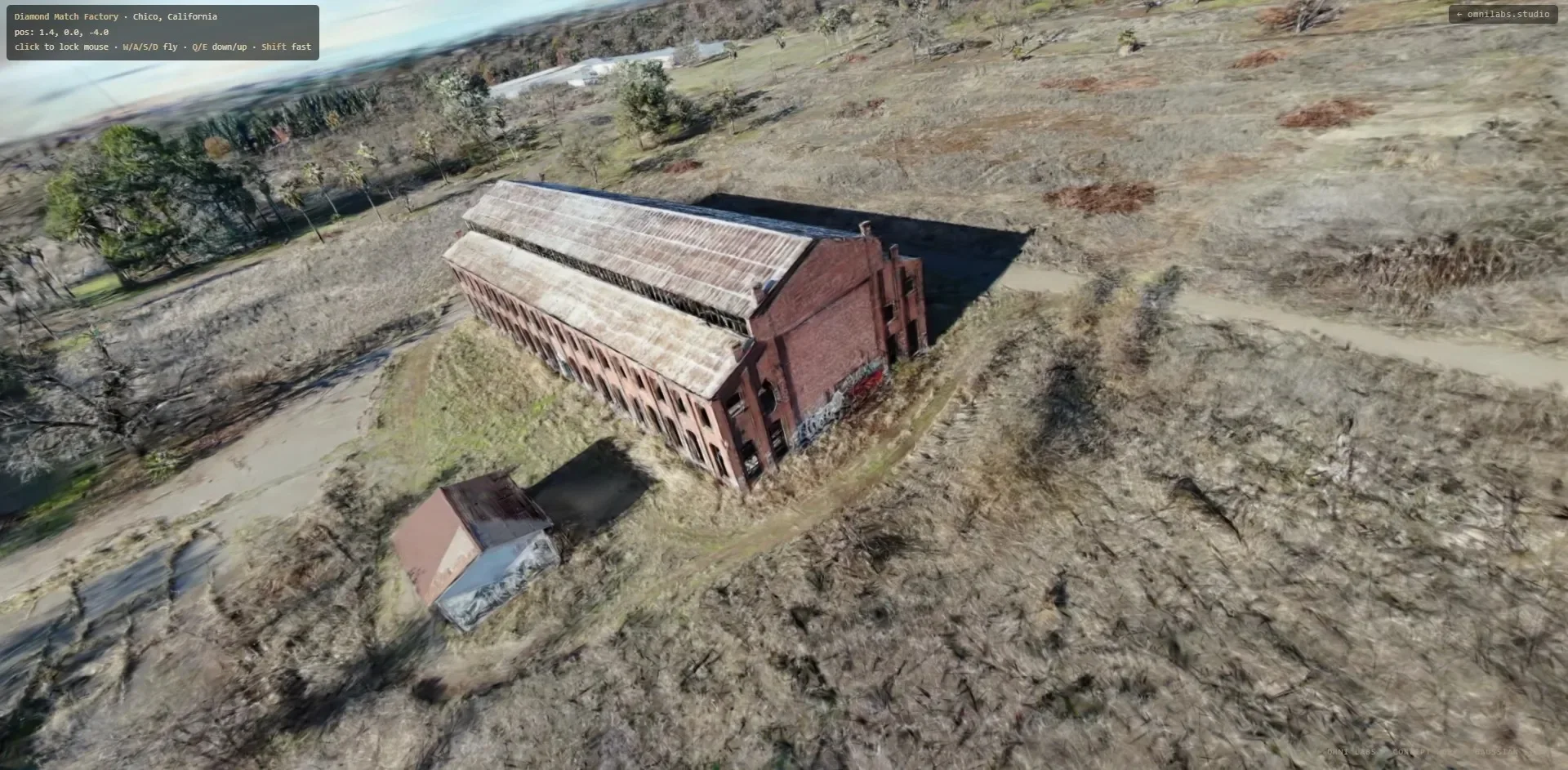
| Brick Factory Facade | Multi-elevation helix orbit | 407 of 407 | ~15k steps (trained to 30,000) | 315 MB |
A second helix orbit of a brick factory facade registered 407 of 407 cameras. Training ran to 30,000 steps; the PLY plateaued near 15k steps at 315 MB, against 380 MB for the church.
Processing complex industrial geometry confirmed the superiority of helical trajectories. A flight path ascending around an abandoned brick factory facade registered 407 of 407 cameras without a single dropped frame. While optimization continued to 30,000 iterations, geometric refinement plateaued near 15k steps, yielding an export file size of 315 MB compared to 380 MB for the church.
COLMAP 4.1.0 GPU configurations and model selection
COLMAP 4.1.0 renamed its GPU flags to --FeatureExtraction.use_gpu and --FeatureMatching.use_gpu. The old --SiftExtraction.use_gpu flag errors out.
Upgrading to COLMAP 4.1.0 introduces breaking command-line parameter modifications that halt automated shell scripts. Legacy documentation and online tutorials routinely specify the deprecated --SiftExtraction.use_gpu argument, which causes the binary to terminate with an unhandled exception. Automation pipelines must configure the updated --FeatureExtraction.use_gpu and --FeatureMatching.use_gpu flags to ensure CUDA acceleration operates correctly.
On the statue run the mapper emitted two sparse models: a 2-image fragment and the real 200-camera model. We pick by the Registered images count from model_analyzer, never by folder number.
When the COLMAP mapper completes bundle adjustment, it frequently outputs multiple reconstruction sub-models. In our statue benchmark, the tool generated a trivial 2-image artifact alongside the primary 200-camera reconstruction. Production scripts must never assume the primary reconstruction resides in subfolder zero. Instead, our automated runner parses model_analyzer output and binds to the model with the highest registered image count.
Brush headless monitoring and frame filtering discipline
Brush prints nothing to stdout, so a run looks hung. We judge progress by nvidia-smi (GPU near 99%, about 9.5 GB) and by PLY files appearing in the output folder.
Operating Brush in headless production environments requires specialized health monitoring. Because the binary suppresses console stdout logging during active optimization passes, an active job can appear stalled. Studio engineers confirm operational health by inspecting nvidia-smi, verifying that GPU compute utilization hovers near 99% with approximately 9.5 GB of allocated VRAM, while monitoring filesystem writes as intermediate PLY checkpoints appear.
Frame prep: ffmpeg at 8 fps scaled to 1920 wide, then drop blurred frames by Laplacian variance below about 0.4 times the median, and thin to about 200 frames. Sharpness matters more than count.
The sequential matcher with loop detection suits an ordered orbit. Matching 200 frames took about 30 minutes on the 5060 Ti.
We dropped 4DAnyone for moving humans: its own Todos list marks low-memory inference (under 32 GB) as unfinished, and its SMPL-X dependency is research-only. It reconstructs people, not static scenes, so it is no substitute for the static rail.